
Share:👇
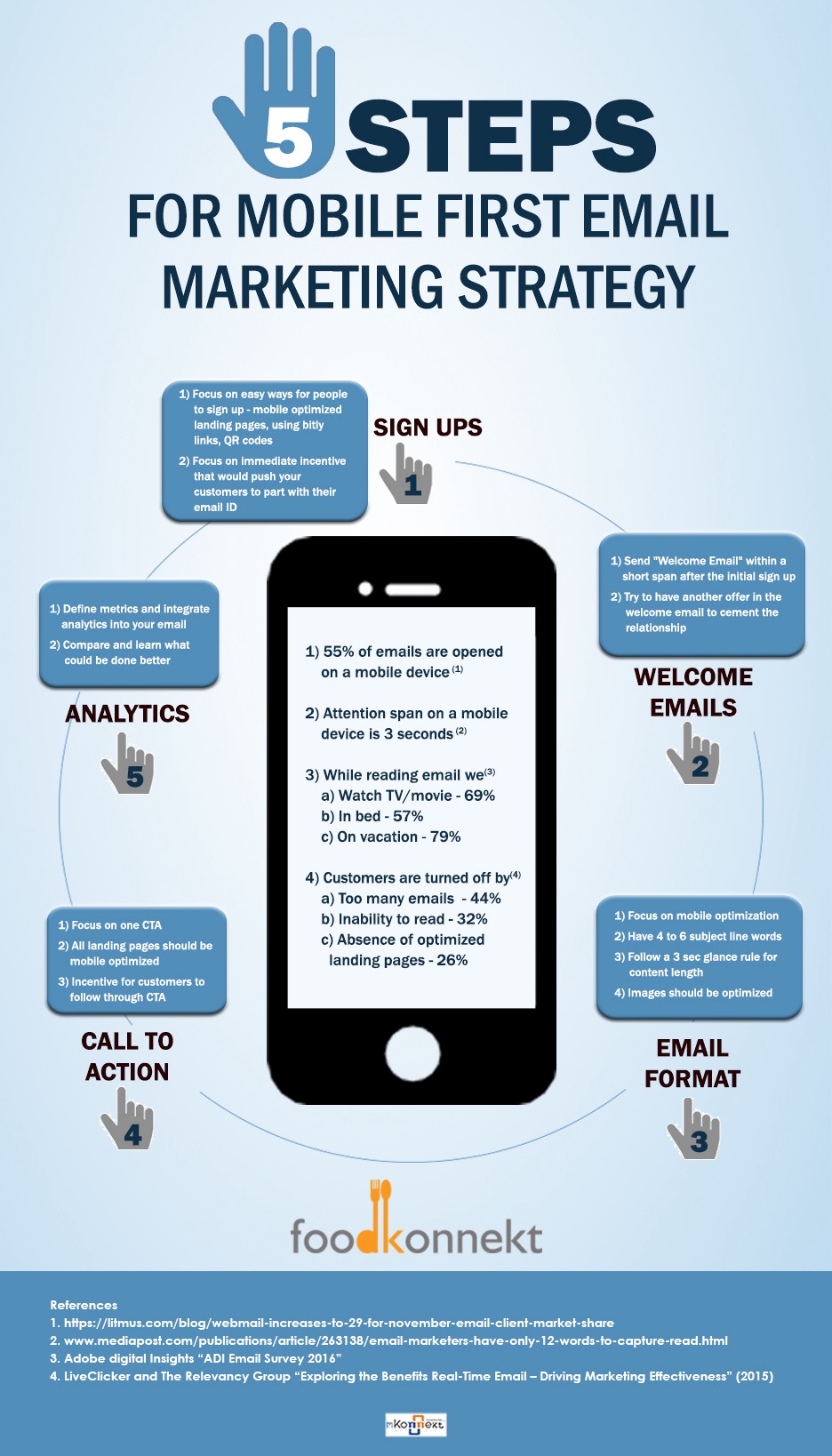
In the age of smartphones and tablets, optimizing your ecommerce emails for mobile has become a critical aspect of your digital marketing strategy. With more and more consumers accessing their emails on-the-go, it’s essential to ensure that your messages are engaging, informative, and easy to navigate on smaller screens.
In this comprehensive guide, we’ll explore seven essential tips to help you optimize your ecommerce emails for mobile devices and drive higher engagement, conversion rates, and customer loyalty.
1. Responsive Design
The foundation of any successful mobile-optimized email campaign is a responsive design. Responsive design ensures that your email content, layout, and images adapt seamlessly to the user’s device, whether they’re viewing it on a smartphone, tablet, or desktop computer.
According to a study by Litmus, mobile email opens account for over 40% of all email opens. This underscores the importance of ensuring that your emails are optimized for mobile devices.
To achieve a responsive design, consider the following best practices:
- Use a flexible grid-based layout that can adjust to different screen sizes.
- Optimize image sizes and dimensions for mobile, ensuring they don’t take too long to load.
- Use large, easy-to-tap call-to-action (CTA) buttons that are prominently displayed.
- Ensure that the text is legible and easy to read on smaller screens.
- Test your emails across multiple devices and email clients to ensure consistent rendering.
By implementing a responsive design, you can ensure that your ecommerce emails provide an optimal user experience for your mobile-savvy customers.
2. Concise and Scannable Content
In the world of mobile email marketing, brevity and scanability are key. Consumers on-the-go often have limited attention spans and may be multitasking, so it’s important to keep your content concise and easy to digest.
Here are some tips to help you create mobile-optimized content:
- Use short, punchy sentences and paragraphs: Avoid long, complicated sentences that can be difficult to read on a small screen.
- Organize your content with clear headings and subheadings: This makes it easier for readers to quickly scan and find the information they need.
- Leverage bullet points and numbered lists: These formatting techniques help break up the content and make it more scannable.
- Use high-impact visuals: Strategically placed images, GIFs, or videos can help convey your message quickly and effectively.
- Keep your calls-to-action (CTAs) clear and prominent: Make it easy for your subscribers to take the desired action, whether it’s making a purchase, visiting a website, or signing up for a promotion.
By prioritizing concise and scannable content, you can ensure that your ecommerce emails capture the attention of your mobile-first audience and drive the desired actions.
3. Optimized Subject Lines and Preheader Text
In the mobile email landscape, subject lines and preheader text play a crucial role in determining whether your message gets opened and engaged with. These elements are often the first (and sometimes only) thing a subscriber sees on their mobile device, so they need to be optimized for maximum impact.
Here are some tips for crafting effective subject lines and preheader text for mobile:
- Keep subject lines short and to-the-point: Aim for 30-50 characters, as longer subject lines may get cut off on smaller screens.
- Use actionable language and create a sense of urgency: Incorporate words like “sale,” “limited-time,” or “exclusive” to pique your subscriber’s interest.
- Personalize your subject lines: Using the recipient’s name or other personalized information can increase open rates.
- Leverage the preheader text to provide additional context: Use this space to expand on your subject line or provide a compelling call-to-action.
- Test different subject line and preheader combinations: Experiment with various approaches to determine what resonates best with your audience.
By optimizing your subject lines and preheader text for mobile, you can increase the chances of your ecommerce emails being opened and engaged with by your subscribers.
4. Efficient Image Optimization
Images play a crucial role in ecommerce emails, helping to showcase products, convey brand identity, and create a visually appealing user experience. However, when it comes to mobile optimization, image size and file format can have a significant impact on load times and overall user experience.
Here are some tips for optimizing images in your ecommerce emails for mobile:
- Use the appropriate file format: JPEG is generally the best choice for product images, as it offers a good balance of image quality and file size. PNG is better suited for graphics with transparent backgrounds.
- Compress your images: Use tools like TinyPNG or Compressor.io to reduce the file size of your images without compromising quality.
- Resize your images for mobile: Ensure that your images are properly sized for mobile screens, typically no wider than 600 pixels.
- Consider using responsive images: Leverage the
srcsetattribute in your HTML to provide different image sizes for different device widths, ensuring the most appropriate image is delivered. - Avoid using multiple large images: Instead, use a single hero image or strategically placed smaller images to reduce the overall file size of your email.
By optimizing your images for mobile, you can improve the load times of your ecommerce emails, providing a seamless and enjoyable experience for your subscribers.
5. Strategic Use of Video and GIFs
In the world of mobile email marketing, video and GIFs can be powerful tools for capturing your audience’s attention and conveying your message in a dynamic, engaging way. However, it’s essential to use these elements strategically to ensure they don’t negatively impact the overall performance of your emails.
Here are some tips for incorporating video and GIFs into your mobile-optimized ecommerce emails:
- Use GIFs sparingly: GIFs can be an effective way to add a touch of interactivity and visual interest to your emails. However, be mindful of file size, as larger GIFs can slow down the loading time of your message.
- Optimize video for mobile: If you decide to include a video in your email, make sure it’s optimized for mobile viewing. This includes using a square or vertical aspect ratio, compressing the file size, and providing a clear call-to-action for the viewer.
- Leverage autoplay with caution: While autoplay can be an effective way to grab your subscriber’s attention, use it with caution, as it can be disruptive on mobile devices and may even be blocked by some email clients.
- Provide an alternative: Always include a fallback image or link for subscribers who can’t view the video or GIF, ensuring that your message remains accessible to all.
- Test, test, test: Preview your emails on various mobile devices and email clients to ensure that your video and GIF elements are displaying correctly and not causing any performance issues.
By strategically incorporating video and GIFs into your ecommerce emails, you can create a more engaging and memorable experience for your mobile-first audience.
6. Streamlined Signup and Unsubscribe Processes
In the world of mobile email marketing, user experience is paramount. This extends not only to the content of your emails but also to the processes of signing up and unsubscribing.
Here are some tips for optimizing the signup and unsubscribe experiences for mobile:
Signup Process:
- Use a simple, mobile-friendly signup form: Minimize the number of form fields and ensure that they are easy to fill out on a small screen.
- Leverage autofill and mobile-friendly input types: Take advantage of the user’s device features to streamline the signup process.
- Provide clear and concise instructions: Guide your subscribers through the signup process with clear, easy-to-follow instructions.
- Offer social media signup options: Allow users to sign up using their existing social media accounts, reducing the friction of the signup process.
Unsubscribe Process:
- Make the unsubscribe link prominent and easy to find: Ensure that the unsubscribe link is clearly visible and accessible, even on a mobile device.
- Streamline the unsubscribe flow: Minimize the number of steps required to unsubscribe, making it a quick and painless process.
- Avoid unnecessary form fields: Only ask for the information necessary to process the unsubscribe request, such as the email address.
- Offer alternative subscription options: Consider providing the ability to adjust email frequency or content preferences instead of a complete unsubscribe.
By optimizing the signup and unsubscribe processes for mobile, you can improve the overall user experience and build trust with your subscribers, ultimately leading to better email engagement and retention.
7. Continuous Testing and Optimization
Optimizing your ecommerce emails for mobile is an ongoing process, not a one-time task. As technology and user behaviors evolve, it’s essential to continuously test and refine your strategies to ensure that your emails remain effective and relevant.
Here are some tips for continuous testing and optimization:
- Monitor email performance metrics: Track key metrics such as open rates, click-through rates, and conversion rates, and use this data to identify areas for improvement.
- A/B test different elements: Experiment with different subject lines, content layouts, CTA placements, and other elements to determine what resonates best with your mobile audience.
- Gather user feedback: Reach out to your subscribers and ask for their input on your email content and design. Use this feedback to inform future iterations.
- Stay up-to-date with industry trends: Keep an eye on the latest developments in mobile email marketing, and adjust your strategies accordingly.
- Leverage email marketing tools and analytics: Utilize tools like Litmus, Email on Acid, or your email service provider’s analytics to gain deeper insights into your email performance and user behavior.
By continuously testing and optimizing your ecommerce emails for mobile, you can ensure that your campaigns remain effective, engaging, and responsive to the evolving needs and preferences of your audience.
Conclusion
In the fast-paced world of ecommerce, optimizing your emails for mobile is no longer an optional consideration – it’s a necessity. By implementing the seven tips outlined in this guide, you can create mobile-friendly ecommerce emails that captivate your audience, drive conversions, and build long-lasting customer relationships.
From responsive design and concise content to strategic use of visuals and continuous testing, each of these best practices plays a crucial role in delivering a seamless and engaging mobile email experience for your ecommerce customers.
Remember, the key to success in mobile email marketing is to remain agile, adaptable, and customer-centric. By continuously monitoring your performance, testing new strategies, and adapting to the evolving needs of your audience, you can ensure that your ecommerce emails remain a powerful and effective tool in your digital marketing arsenal.
References
- 7 Tips for Optimizing Ecommerce Emails for Mobile
- Responsive Design for Ecommerce Email Campaigns
- Improving Ecommerce Email Engagement with Scannable Content
- Optimizing Ecommerce Email Subject Lines and Preheaders for Mobile
- Strategies for Optimizing Images in Ecommerce Emails for Mobile
- Using Video and GIFs in Ecommerce Emails for Mobile Engagement
- Improving the Mobile Signup and Unsubscribe Experience for Ecommerce Emails
Share:👇
Subscribe to get more of such amazing content 👇
Related post
- How to Start a Print on Demand Business: A Comprehensive Guide
 Share:👇 Starting a print on demand (POD) business can be an exciting and profitable venture, especially in today’s era of e-commerce. Whether you’re an artist looking to monetize your designs or an entrepreneur exploring new business avenues, the POD model offers a low-risk, scalable method of selling custom products without the need for inventory or… Read more: How to Start a Print on Demand Business: A Comprehensive Guide
 - Mistakes Most Young Entrepreneurs Make When Starting an Online Business
 Share:👇 Starting an online business can be an exciting and rewarding venture for young entrepreneurs, but it also comes with its fair share of challenges. Many young entrepreneurs make common mistakes that can hinder their success and lead to the downfall of their businesses. In this comprehensive guide, we will explore the most prevalent mistakes… Read more: Mistakes Most Young Entrepreneurs Make When Starting an Online Business
 - Starting a Dropshipping Website on Spocket: What You Need to Know
 Share:👇 Introduction In the ever-evolving world of e-commerce, dropshipping has emerged as a game-changing business model that has revolutionized the way entrepreneurs approach online retail. Spocket, a leading dropshipping platform, has become a popular choice for those looking to venture into this lucrative space. [1] This comprehensive guide will delve into the intricacies of starting… Read more: Starting a Dropshipping Website on Spocket: What You Need to Know
 - The 10 Best Dropshipping Websites for Ecommerce Success in 2024
 Share:👇 Introduction In the ever-evolving world of ecommerce, dropshipping has emerged as a game-changing business model that allows entrepreneurs to start and scale online stores without the hassle of managing inventory. By partnering with reliable suppliers, dropshipping enables you to offer a wide range of products to your customers while minimizing upfront costs and overhead.… Read more: The 10 Best Dropshipping Websites for Ecommerce Success in 2024
 - The Ultimate Guide to the Best Affiliate Marketing Websites
 Share:👇 Introduction Affiliate marketing has become one of the most popular ways to earn passive income online. With the right strategies and tools, you can turn your website into a revenue-generating machine. In this guide, we’ll explore the best affiliate marketing websites, provide in-depth reviews, and share tips on how to maximize your earnings. What… Read more: The Ultimate Guide to the Best Affiliate Marketing Websites
 - Mastering Long-Form Content for SEO in 2024 and Beyond
 Share:👇 In the ever-evolving world of search engine optimization (SEO), the importance of long-form content has become increasingly apparent. As Google and other search engines continue to prioritize high-quality, in-depth information, crafting compelling long-form content has become a crucial strategy for businesses and content creators looking to rank higher in search results and engage their… Read more: Mastering Long-Form Content for SEO in 2024 and Beyond
 - The Rise of AI in SEO: Navigating the Changing Landscape of Search Engine Optimization in 2024 and Beyond
 Share:👇 Introduction: The Evolving Role of AI in SEO As we look ahead to 2024 and beyond, the world of search engine optimization (SEO) is undergoing a profound transformation, driven largely by the rapid advancements in artificial intelligence (AI) technology. The impact of AI on SEO is undeniable, presenting both opportunities and challenges for marketers,… Read more: The Rise of AI in SEO: Navigating the Changing Landscape of Search Engine Optimization in 2024 and Beyond
 - The Transformative Role of Blockchain in Digital Marketing
 Share:👇 Introduction In the ever-evolving landscape of digital marketing, the emergence of blockchain technology has sparked a revolution, redefining the way businesses engage with their customers and approach their marketing strategies. As the digital world continues to grapple with issues of transparency, data security, and trust, blockchain has emerged as a game-changing solution, offering a… Read more: The Transformative Role of Blockchain in Digital Marketing
 - Unlocking the Power of Facebook Ads: A Comprehensive Guide to Maximizing ROI
 Share:👇 In the ever-evolving digital landscape, Facebook ads have emerged as a powerful tool for businesses of all sizes to reach and engage their target audience. With over 2.9 billion monthly active users, Facebook provides unparalleled access to a vast and diverse customer base, making it an essential component of any comprehensive marketing strategy. However,… Read more: Unlocking the Power of Facebook Ads: A Comprehensive Guide to Maximizing ROI
 - The Future of Affiliate Marketing: Navigating the Evolving Landscape
 Share:👇 Introduction: The Affiliate Marketing Landscape in Flux In the ever-changing world of digital marketing, affiliate marketing has emerged as a powerful and lucrative strategy for businesses and individuals alike. As the industry continues to evolve, it’s crucial for both seasoned and aspiring affiliate marketers to stay ahead of the curve and understand the trends… Read more: The Future of Affiliate Marketing: Navigating the Evolving Landscape


 Hubgenus