
Share:👇
The Importance of Web Accessibility in Modern Web Development
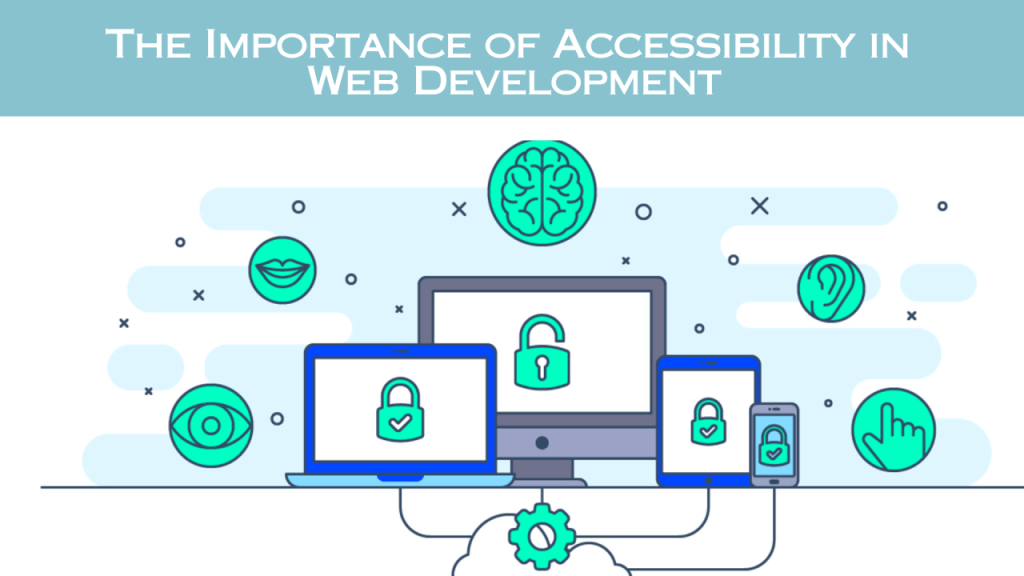
Web accessibility has become an increasingly important topic in the world of web development in recent years. As more of our daily lives and essential services move online, it is crucial that websites and web applications are designed and built to be accessible to users of all abilities.
Web accessibility refers to the practice of designing and developing websites and web-based content that can be used by people with a diverse range of physical, cognitive, auditory, and visual abilities. This includes individuals with disabilities as well as those using a wide variety of devices, browsers, and internet connections.
The foundation of web accessibility is the Web Content Accessibility Guidelines (WCAG), a set of guidelines and success criteria developed by the Web Accessibility Initiative (WAI) of the World Wide Web Consortium (W3C). WCAG 2.1, the latest version published in 2018, provides a comprehensive framework for making web content more accessible [1].
Importance of Web Accessibility
There are several key reasons why web accessibility should be a priority for web developers, designers, and organizations building websites and web applications:
Legal and Regulatory Requirements
Many countries around the world have enacted laws and regulations mandating that public-facing websites meet certain accessibility standards. For example, in the United States, the Americans with Disabilities Act (ADA) requires that all “public accommodations” provided through websites be accessible to people with disabilities [2]. Similar legislation exists in the European Union, Canada, Australia, and other regions.
Failing to meet these legal requirements can result in significant fines and lawsuits. High-profile cases, such as the lawsuits against Domino’s Pizza, Winn-Dixie, and other major companies, have highlighted the legal risks of ignoring web accessibility [3].
Expanding the Potential User Base
By making websites and web applications accessible, organizations can reach a much larger audience and potential customer base. Approximately 15% of the global population, or over 1 billion people, live with some form of disability [4]. Ensuring that your website is accessible to this significant demographic can dramatically increase your potential reach and customer base.
Beyond just users with disabilities, accessible design principles often benefit all users. Features like clear and consistent navigation, alternative text for images, and keyboard-friendly interfaces can improve the user experience for everyone.
Improved Search Engine Optimization (SEO)
Many of the best practices for web accessibility, such as using proper semantic markup, providing alt text for images, and ensuring content is easily navigable, also align with the principles of good search engine optimization (SEO).
Search engines like Google prioritize websites that are well-structured, provide a positive user experience, and are accessible to users with disabilities. Incorporating accessibility into your web development and design process can, therefore, have a positive impact on your website’s search engine rankings and visibility.
Enhanced User Experience
At its core, web accessibility is about ensuring that all users, regardless of their abilities, can access and interact with web content in a way that is meaningful and effective for them. This focus on user experience is a key driver behind the push for greater web accessibility.
By considering the needs of users with disabilities, web developers and designers are forced to think more holistically about the user experience and implement features that benefit everyone. Clear, intuitive navigation, alternative content formats, and keyboard-accessible interfaces all contribute to a better overall user experience.
Ethical Obligations
Beyond the legal and business case for web accessibility, there is also a strong ethical argument. In today’s digital-first world, the internet has become an essential tool for access to information, services, and opportunities. Excluding people with disabilities from full participation in the online world is deeply unethical and perpetuates existing inequalities.
Web developers and designers have a moral obligation to ensure that the websites and applications they create are inclusive and accessible to all users. Embracing accessibility is a key part of creating a more just, equitable, and inclusive digital landscape.
Web Accessibility Best Practices
To create truly accessible websites and web applications, web developers and designers must follow a range of best practices and guidelines. Some of the key areas to focus on include:
Semantic HTML
The foundation of web accessibility is the proper use of semantic HTML. This means using the correct HTML elements to mark up the structure and meaning of content, rather than just focusing on visual presentation.
For example, using the <h1>, <h2>, and other heading tags to indicate the hierarchy of content, rather than just making text larger or bold. Or using the <nav> element to denote the site’s main navigation, rather than a generic <div>.
Semantic HTML provides crucial information to assistive technologies like screen readers, allowing users with disabilities to better understand and navigate the content.
Alt Text and Descriptions
Providing alternative text (alt text) descriptions for images, videos, and other non-text content is essential for users who cannot perceive these elements visually. Screen readers will read the alt text aloud, allowing users who are blind or have low vision to understand the content.
Alt text should be concise yet descriptive, focusing on conveying the meaning and purpose of the image or media, rather than just describing what it depicts. For complex images, longer detailed descriptions may be appropriate.
Keyboard Accessibility
Many users, including those with physical disabilities, rely on keyboard input rather than a mouse to navigate and interact with websites. Ensuring that all functionality on a site can be accessed and operated using only a keyboard is a key accessibility requirement.
This includes ensuring that all interactive elements like links, buttons, and form fields can be reached and activated via the keyboard, typically using the Tab key to navigate and the Enter or Spacebar keys to interact.
Color Contrast and Visual Design
The visual design of a website can have a significant impact on accessibility, particularly for users with visual impairments. Ensuring sufficient color contrast between text and background, avoiding the use of color alone to convey information, and providing high-contrast visual alternatives are all important considerations.
The WCAG guidelines provide specific requirements for minimum color contrast ratios, as well as recommendations for the use of color, typography, and other visual elements.
Captions and Transcripts
For users who are deaf or hard of hearing, providing captions for videos and transcripts for audio content is essential. Captions synchronize the text of spoken dialogue and other audio with the visual elements of a video, allowing users to fully engage with the content.
Transcripts provide a textual representation of the audio, which can be useful for users who prefer to read the content, as well as for search engine optimization (SEO) purposes.
Accessible Forms and Navigation
Forms and navigation are critical components of most websites and web applications. Ensuring that these elements are designed with accessibility in mind is crucial.
This includes providing clear and descriptive labels for form fields, ensuring that form controls can be operated via the keyboard, and implementing proper focus management to guide users through the form or navigation process.
Clear and consistent navigation, with multiple ways to reach content, is also an important aspect of accessible web design.
ARIA (Accessible Rich Internet Applications)
ARIA, or Accessible Rich Internet Applications, is a set of attributes that can be added to HTML elements to provide additional semantic information to assistive technologies. ARIA allows developers to enhance the accessibility of dynamic content and advanced user interface components that may not have direct HTML equivalents.
ARIA attributes can be used to describe the role, state, and properties of elements, enabling screen readers and other assistive technologies to better understand and convey the purpose and functionality of these elements to users.
Testing and Validation
Ensuring web accessibility is not a one-time task, but rather an ongoing process that requires regular testing and validation. Web developers and designers should incorporate accessibility testing into their development workflows, using a combination of automated tools and manual evaluation.
Automated tools like WAVE, Axe, and tota11y can help identify many common accessibility issues, while manual testing with assistive technologies and diverse user groups is essential for a more comprehensive understanding of the user experience.
Continuous testing and validation throughout the development lifecycle helps to identify and address accessibility barriers before they are deployed to users.
Implementing Web Accessibility
Integrating web accessibility best practices into the web development process can seem daunting, but there are a number of strategies and resources available to help:
- Educate and Raise Awareness: Ensure that all members of the web development team, as well as stakeholders and decision-makers, understand the importance of web accessibility and are committed to making it a priority.
- Establish Accessibility Standards: Define clear accessibility standards and guidelines for your organization, based on WCAG and other recognized best practices. Incorporate these standards into your design and development processes.
- Utilize Accessibility-Focused Tools: Leverage tools and frameworks that have accessibility built-in, such as accessible UI component libraries, automated testing tools, and browser extensions that highlight accessibility issues.
- Incorporate Accessibility Testing: Integrate accessibility testing into your quality assurance (QA) process, using a combination of automated tools and manual testing with diverse user groups.
- Provide Ongoing Training: Offer regular training and professional development opportunities for web developers and designers to stay up-to-date on the latest accessibility best practices and techniques.
- Collaborate with Accessibility Experts: Consider partnering with accessibility consultants or user experience researchers who can provide expert guidance and insights to enhance the accessibility of your web projects.
- Embrace a Holistic Approach: Recognize that web accessibility is not just a technical challenge, but also involves considerations around user experience, content strategy, and organizational culture. Approach it as a comprehensive, cross-functional initiative.
- Continuously Improve and Iterate: Web accessibility is an ongoing process, not a one-time goal. Regularly review and update your accessibility practices, stay informed of evolving standards and guidelines, and continuously work to improve the user experience for all.
By following these strategies and leveraging the wealth of resources and tools available, web developers and designers can make significant strides in creating more accessible and inclusive websites and web applications.
Conclusion
Web accessibility is a critical issue that web developers and designers cannot afford to ignore. As the digital world becomes increasingly central to our daily lives, ensuring that websites and web-based services are accessible to users of all abilities is not just a legal and ethical imperative, but also a strategic business priority.
By embracing the principles of web accessibility and integrating best practices into the web development lifecycle, organizations can create more inclusive, user-friendly, and successful digital experiences. This not only benefits users with disabilities, but enhances the overall user experience for everyone.
As the web continues to evolve, web accessibility will only become more important. By prioritizing accessibility now, web developers and designers can future-proof their work, stay ahead of regulatory requirements, and contribute to building a more inclusive and equitable digital landscape.
Share:👇
Subscribe to get more of such amazing content 👇
Related post
- How to Start a Print on Demand Business: A Comprehensive Guide
 Share:👇 Starting a print on demand (POD) business can be an exciting and profitable venture, especially in today’s era of e-commerce. Whether you’re an artist looking to monetize your designs or an entrepreneur exploring new business avenues, the POD model offers a low-risk, scalable method of selling custom products without the need for inventory or… Read more: How to Start a Print on Demand Business: A Comprehensive Guide
 - Mistakes Most Young Entrepreneurs Make When Starting an Online Business
 Share:👇 Starting an online business can be an exciting and rewarding venture for young entrepreneurs, but it also comes with its fair share of challenges. Many young entrepreneurs make common mistakes that can hinder their success and lead to the downfall of their businesses. In this comprehensive guide, we will explore the most prevalent mistakes… Read more: Mistakes Most Young Entrepreneurs Make When Starting an Online Business
 - Starting a Dropshipping Website on Spocket: What You Need to Know
 Share:👇 Introduction In the ever-evolving world of e-commerce, dropshipping has emerged as a game-changing business model that has revolutionized the way entrepreneurs approach online retail. Spocket, a leading dropshipping platform, has become a popular choice for those looking to venture into this lucrative space. [1] This comprehensive guide will delve into the intricacies of starting… Read more: Starting a Dropshipping Website on Spocket: What You Need to Know
 - The 10 Best Dropshipping Websites for Ecommerce Success in 2024
 Share:👇 Introduction In the ever-evolving world of ecommerce, dropshipping has emerged as a game-changing business model that allows entrepreneurs to start and scale online stores without the hassle of managing inventory. By partnering with reliable suppliers, dropshipping enables you to offer a wide range of products to your customers while minimizing upfront costs and overhead.… Read more: The 10 Best Dropshipping Websites for Ecommerce Success in 2024
 - The Ultimate Guide to the Best Affiliate Marketing Websites
 Share:👇 Introduction Affiliate marketing has become one of the most popular ways to earn passive income online. With the right strategies and tools, you can turn your website into a revenue-generating machine. In this guide, we’ll explore the best affiliate marketing websites, provide in-depth reviews, and share tips on how to maximize your earnings. What… Read more: The Ultimate Guide to the Best Affiliate Marketing Websites
 - Mastering Long-Form Content for SEO in 2024 and Beyond
 Share:👇 In the ever-evolving world of search engine optimization (SEO), the importance of long-form content has become increasingly apparent. As Google and other search engines continue to prioritize high-quality, in-depth information, crafting compelling long-form content has become a crucial strategy for businesses and content creators looking to rank higher in search results and engage their… Read more: Mastering Long-Form Content for SEO in 2024 and Beyond
 - The Rise of AI in SEO: Navigating the Changing Landscape of Search Engine Optimization in 2024 and Beyond
 Share:👇 Introduction: The Evolving Role of AI in SEO As we look ahead to 2024 and beyond, the world of search engine optimization (SEO) is undergoing a profound transformation, driven largely by the rapid advancements in artificial intelligence (AI) technology. The impact of AI on SEO is undeniable, presenting both opportunities and challenges for marketers,… Read more: The Rise of AI in SEO: Navigating the Changing Landscape of Search Engine Optimization in 2024 and Beyond
 - The Transformative Role of Blockchain in Digital Marketing
 Share:👇 Introduction In the ever-evolving landscape of digital marketing, the emergence of blockchain technology has sparked a revolution, redefining the way businesses engage with their customers and approach their marketing strategies. As the digital world continues to grapple with issues of transparency, data security, and trust, blockchain has emerged as a game-changing solution, offering a… Read more: The Transformative Role of Blockchain in Digital Marketing
 - Unlocking the Power of Facebook Ads: A Comprehensive Guide to Maximizing ROI
 Share:👇 In the ever-evolving digital landscape, Facebook ads have emerged as a powerful tool for businesses of all sizes to reach and engage their target audience. With over 2.9 billion monthly active users, Facebook provides unparalleled access to a vast and diverse customer base, making it an essential component of any comprehensive marketing strategy. However,… Read more: Unlocking the Power of Facebook Ads: A Comprehensive Guide to Maximizing ROI
 - The Future of Affiliate Marketing: Navigating the Evolving Landscape
 Share:👇 Introduction: The Affiliate Marketing Landscape in Flux In the ever-changing world of digital marketing, affiliate marketing has emerged as a powerful and lucrative strategy for businesses and individuals alike. As the industry continues to evolve, it’s crucial for both seasoned and aspiring affiliate marketers to stay ahead of the curve and understand the trends… Read more: The Future of Affiliate Marketing: Navigating the Evolving Landscape


 Hubgenus